Prove the shutter count. Sell with one less argument.
Every used-camera listing says the shutter count. Nobody can check it. A ShutterCount verified certificate is read from your RAW file and signed by our server, and the buyer verifies it in one tap — before they ever message you.
One-time payment per camera file · no account · available for bodies this tool reads reliably
How it works
- Drop a RAW file from the cameraUse the checker on the homepage. If the body qualifies, the result card shows a Verified certificate button.
- Only the metadata leaves your computerThe browser works out the exact byte ranges the parser needs — the EXIF and MakerNote blocks, usually a few hundred KB — and sends just those. The image never leaves your machine.
- Pay $4.99, the server reads the file itselfAfter payment, the shuttercount.app server re-reads the shutter count, camera model, body serial number and last-shot date from those bytes and signs them. The payment is bound to that exact file.
- Share the link or the PDFYou get a public verification link, a QR code and a PDF. Put the link in your listing; the buyer sees what was signed.
What the buyer sees
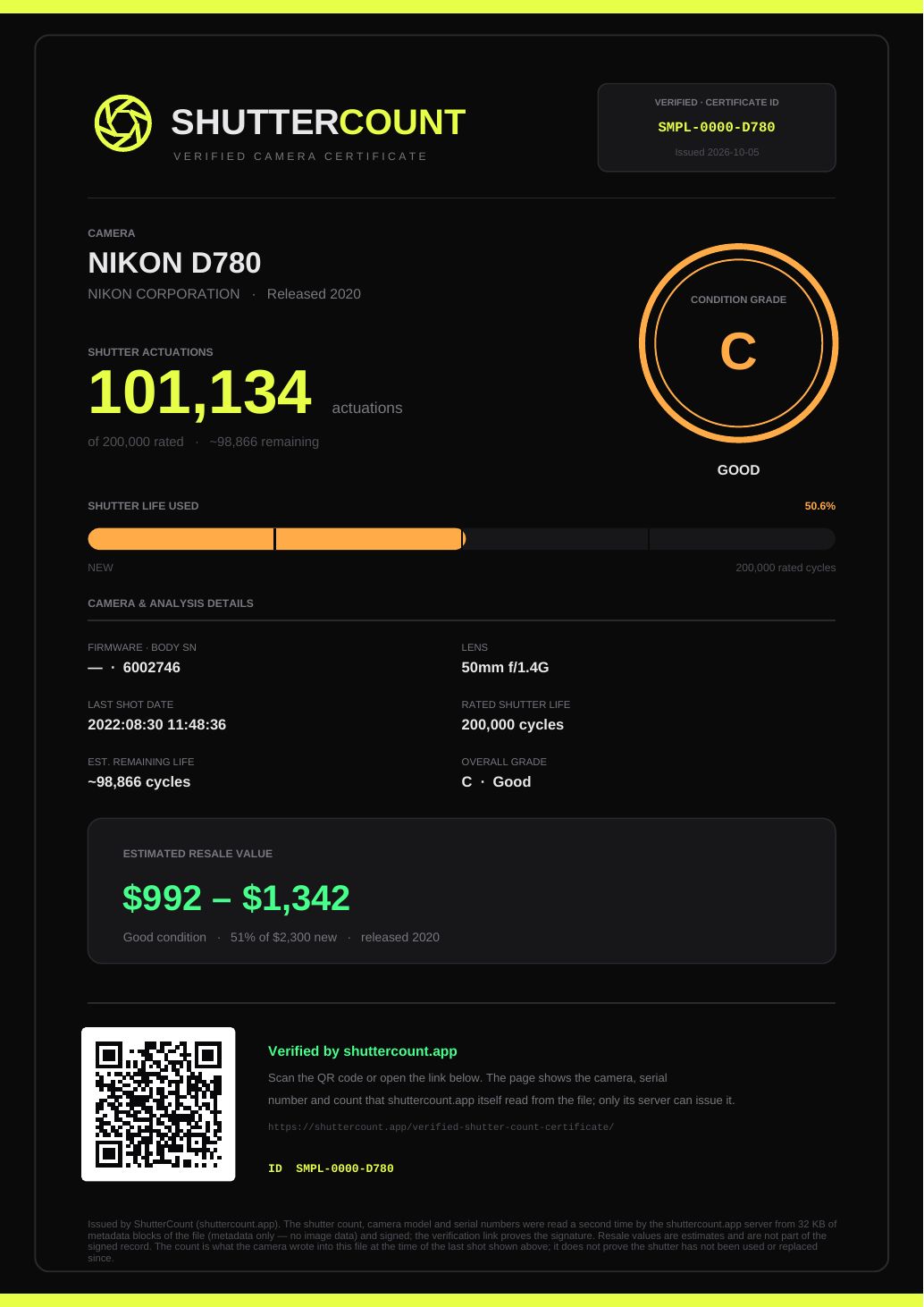
What it proves
- The shutter count, model, body serial number and shot date were read by the shuttercount.app server, not typed by the seller.
- Nothing was changed afterwards — any edit breaks the signature.
- The buyer can compare the body serial number with the camera in front of them.
What it does not prove
- That the shutter has not been used, repaired or replaced since the shot shown. Ask for a fresh file.
- Cosmetic condition, sensor state, or that the seller owns the camera.
- For Fujifilm bodies the counter is an image counter that resets when the camera memory is formatted.
Verified certificate vs. a screenshot
| Screenshot or self-made PDF | Verified certificate | |
|---|---|---|
| Who read the file | The seller, on their own machine | The shuttercount.app server |
| Can it be edited | Yes, in any image editor | No — edits break the signature |
| Buyer verification | None | Link or QR code, one tap |
| Body serial number | Only if the seller includes it | Signed when the camera writes it |
| Photo uploaded | — | No, metadata block only |
Which cameras qualify
The same rule as the free checker: a certificate is issued only where this tool reads the count reliably. That covers most Nikon DSLR and Z bodies, Sony Alpha bodies, Canon EOS R-series bodies with a confirmed CR3 offset, Pentax and Ricoh GR III/IV, and the newer Fujifilm generation. Where a reading is experimental or known to be unreliable, the button simply does not appear. The full list, with caveats, is in the tested cameras section and on supported cameras.
Canon consumer DSLRs (5D, 6D, 7D, 80D, Rebel) and Olympus, OM System and Panasonic bodies do not store a shutter count in their RAW files, so no certificate can be issued for them from a file.
Questions
Is my photo uploaded?
No. The browser sends only the byte ranges the parser needs — the EXIF and MakerNote metadata, usually a few hundred kilobytes and at most 4 MB. The image data never leaves your computer. The free checker on the homepage sends nothing at all.
What exactly is signed?
Camera make and model, shutter count, body serial number, lens model and lens serial number where the file carries them, the date and time of the shot, the file name, a fingerprint of the metadata bytes, and the issue time. The resale value estimate shown on the homepage is not part of the signed record.
How does the buyer check it?
They open the link or scan the QR code on the PDF. The page at shuttercount.app/v/ validates the signature and shows what was signed. A PDF whose link does not open a valid verification page is not a ShutterCount certificate.
Can I reuse one payment for several cameras?
No. The payment is bound to the exact file you certified. Each camera needs its own $4.99 certificate. Downloading the same certificate again is free and gives the identical document.
What if the buyer wants a fresher count?
Take a new photo and certify the new file. The certificate always states the date of the shot it was read from, so an old date is visible to the buyer.
Why does the free checker not need a server but the certificate does?
Because a number shown in your own browser, or a PDF made there, is only as trustworthy as the person who made it. For a buyer the value is in a third party having read the file. That is the one thing on this site that cannot run locally.